Showing posts with label update. Show all posts

Wednesday, December 18, 2013

Cancel salesline in x++ code (including CW)

Cancelling an open salesline through code is a simple task.
When you're operating with catch weight items you need to include the CW remainder field.

The following code will cancel all open lines on a sales order that has been invoiced.
Don't forget tts.

    while select forupdate salesLine
    join salesTable
        where   salesTable.SalesId == "[Your SO]"
        &&      salesTable.SalesStatus == SalesStatus::Backorder
        &&      salesTable.DocumentStatus == DocumentStatus::Invoice
        &&      salesLine.SalesStatus == SalesStatus::Backorder
    {
        salesLine.RemainInventPhysical = 0;
        salesLine.RemainSalesPhysical = 0;
        salesLine.PdsCWRemainInventPhysical = 0;
        salesLine.Update();
    }


Friday, October 26, 2012

Get rid of "The model store has been modified" dialog

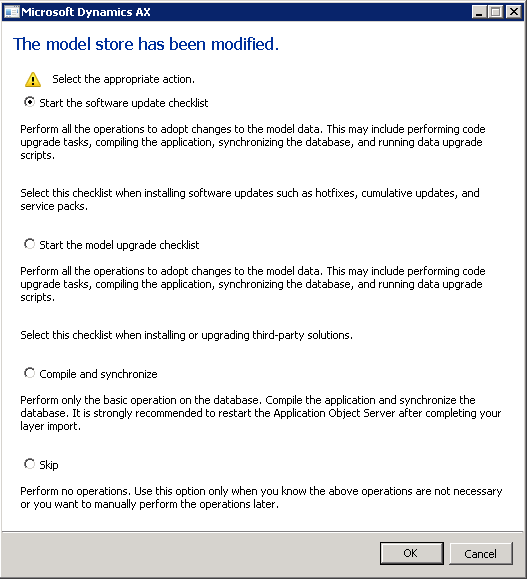
After upgrading Microsoft Dynamics AX 2012 you will get the following dialog upon starting the AX client:

When you have performed the appropriate upgrade actions (AOT compile, code check, CIL compile, synchronize, upgrade scripts), the dialog still might pop up every time you start the client. Selecting "Skip" will not solve this.

To avoid the dialog from appearing, you can do one of the following:

  1. If you have started one of the checklists, check that you have marked alle the actions as complete by clicking the link "Mark as complete" on each action.
  2. Prevent the dialog from appearing by clicking
    System administration > Setup > Checklists > Prevent startup of checklists

I would prefer the first alternative, since it will require you to confirm that you actually performed all the necessary upgrade steps.